Interactive explainer / 2026
See the decision change.
An interactive introduction to policy iteration. Change a strategy, see what it costs, and watch the next decision improve.
Make the mechanism visible
Policy iteration alternates between evaluating a strategy and improving it. Those two steps are easy to repeat in words and harder to picture.
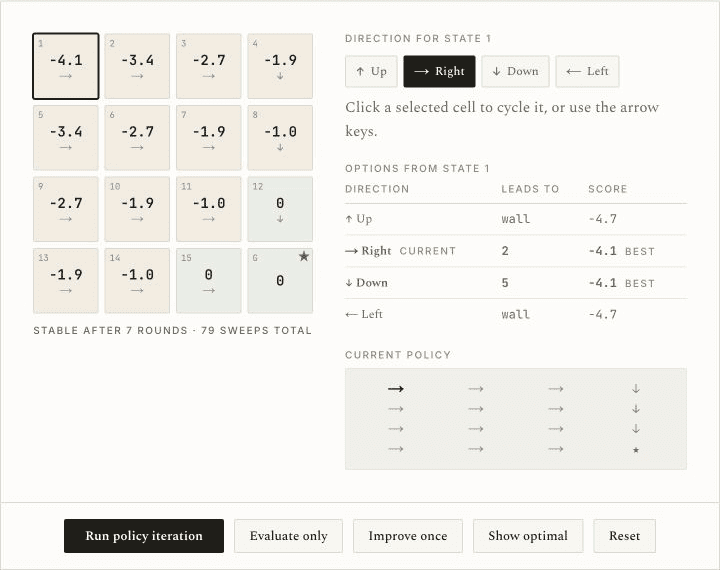
I built a guided walkthrough and an editable sandbox around a grid world. The interface puts the current action, its value, and the alternatives together, so you can inspect what changes.
Learn it, then change it
Start with four rooms
The guided example uses a 2×2 grid. Step controls and a timeline let you stop at a single evaluation or improvement step.
Write a different policy
In the 4×4 sandbox, select a cell and set its direction. You can create a useful route, a detour, or a policy that gets stuck.
Separate the two operations
“Evaluate only” scores the current strategy. “Improve once” changes its actions. “Run policy iteration” alternates both until the strategy stops changing.
What the interface reveals
- Consequences, not just arrows.
- The selected state shows where each direction leads and its score. A wall is visible as a repeated state, rather than an unexplained bad result.
- Progress at two scales.
- The grid shows the whole strategy while the selected-state table explains one decision. The result traces routes from individual starting states to the goal.
- Control over the pace.
- The walkthrough can be stepped manually or played. The sandbox exposes each operation separately, so the reader can test a hypothesis rather than only watch an animation.
Give it a bad strategy.
Start with every state pointing into a wall. Evaluate it, improve it, and follow one state all the way to the goal.